The problem isn’t AWS. It’s still thinking in terms of a single account
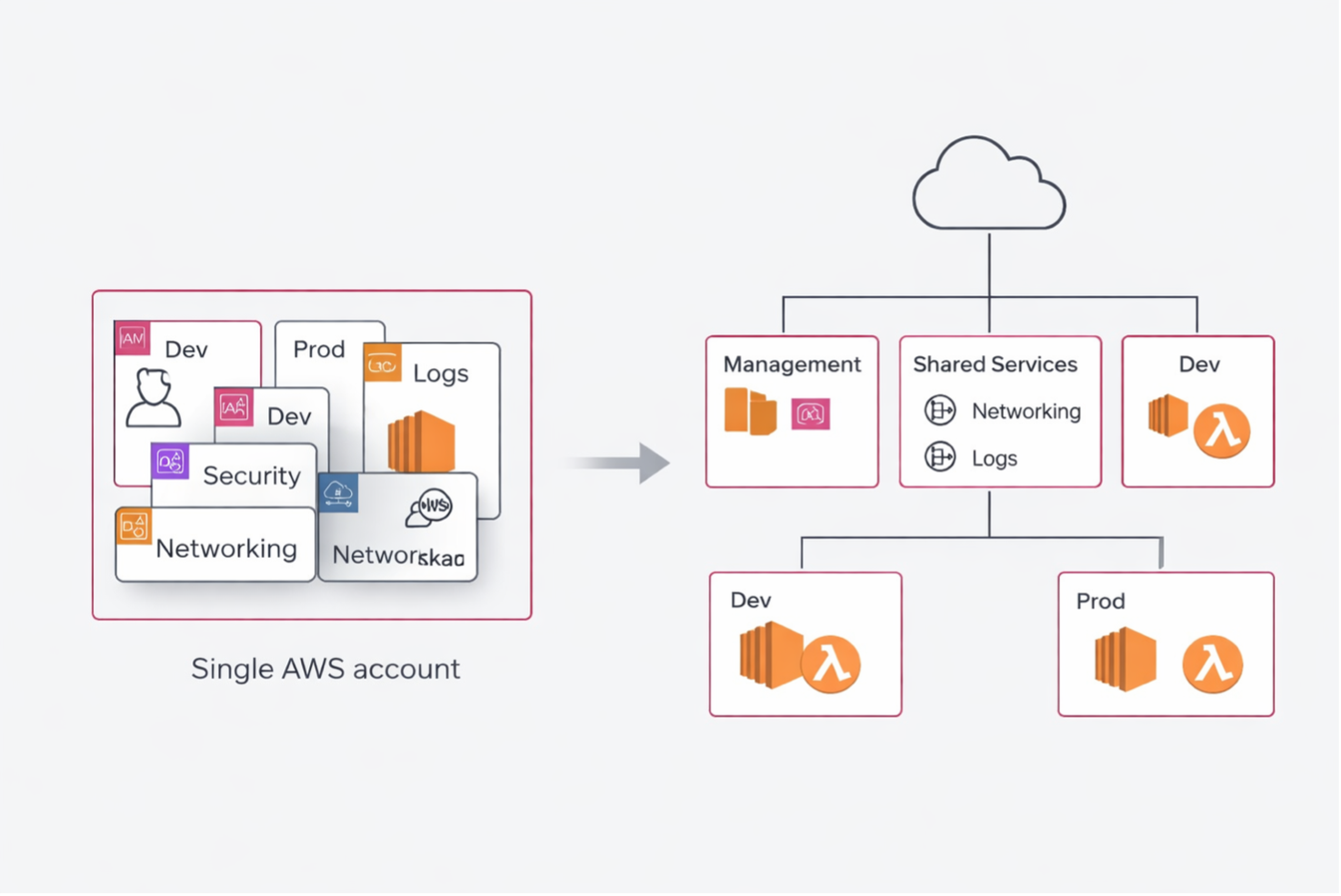



There comes a moment when you realize whether a team is truly starting to use AWS in a mature way. It’s not when they discover Terraform. It’s not when they spin up their first Kubernetes cluster. It’s not even when they automate a decent pipeline.
It’s when they stop thinking as if everything had to live inside a single account.
At first, a single account can even seem like a good idea. It’s simple, fast, tidy only on the surface. You have one place to put networking, IAM, logs, workloads, environments, testing, production. For a few weeks, it may even seem efficient.
Then the team grows. Different environments appear, more granular permissions, audits, cost attribution, separation of responsibilities, security constraints. And what at first seemed “simple” becomes nothing more than an accumulation of exceptions.
The point, to me, is very simple: a single account may be fine to get started, but it quickly stops being an operating model.
When a single account stops being convenient
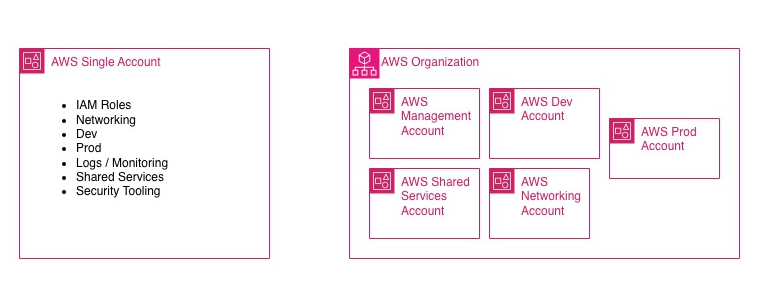
The first problem is environment separation. Keeping dev and prod in the same account is a shortcut that almost always starts with good intentions and ends with overly broad permissions, confusing naming, resources that are hard to govern, and an unnecessary blast radius.
The second problem is the blast radius itself. In a single account, a configuration mistake, a wrong policy, or an operation launched with privileges that are too broad can affect far more than they should.
The third is governance. AWS Organizations exists precisely to manage multiple accounts with centralized policies and boundaries, instead of treating growth as a sum of workarounds.
Separating accounts is not enough
This, in my view, is where the most common misunderstanding lies: creating multiple accounts and thinking you’ve solved the problem.
No. You’ve only distributed the problem across multiple containers.
A multi-account environment only makes sense if it introduces clear boundaries: who administers, who deploys, who observes, who can assume cross-account roles, what can be shared, and what cannot. Without this, multi-account is not a model: it is only a multiplication of disorder.
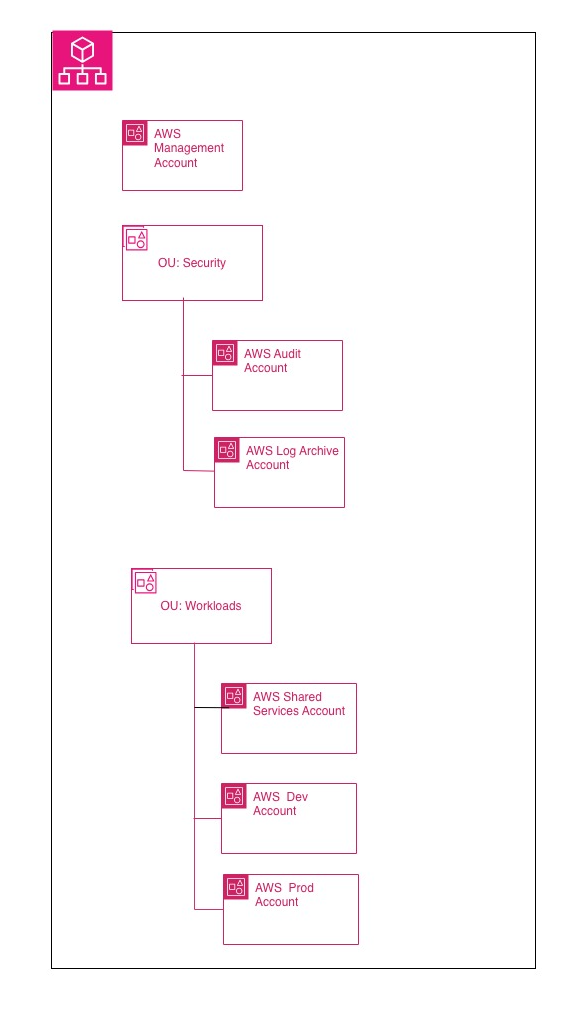
This is where Organizations, OUs, and Service Control Policies come into play.
SCPs are not IAM
This is the point where I see the most confusion, even in teams that have been working on AWS for a while.
Service Control Policies are not meant to grant access. They do not give permissions to users or roles. They define the maximum boundary of what can be done within the organization’s member accounts. Effective permission is still granted by IAM policies or resource-based policies. In practice: IAM grants, but an SCP can still block. AWS in fact describes them as coarse-grained guardrails, not as a grant mechanism. They also apply to member accounts, including the root user of those member accounts, but not to users and roles in the management account.
For this reason, in my view, SCPs should be used to do a few things, but important ones: prevent the use of certain Regions, block destructive operations, prevent security controls from being disabled, and enforce organizational guardrails. Not to rewrite IAM under another name.
Human access should not go through scattered users across accounts
If multi-account is serious, human access must be serious too.
The sensible entry point today is not a collection of local IAM users distributed across accounts, but IAM Identity Center connected to a centralized identity provider or used as a centralized directory. AWS presents it as the solution for connecting workforce users to AWS accounts and applications, and in its security guidance it recommends this approach to provide SSO, centralized management, and a single source of identity. When you enable IAM Identity Center, the recommended instance type is precisely the organization instance.
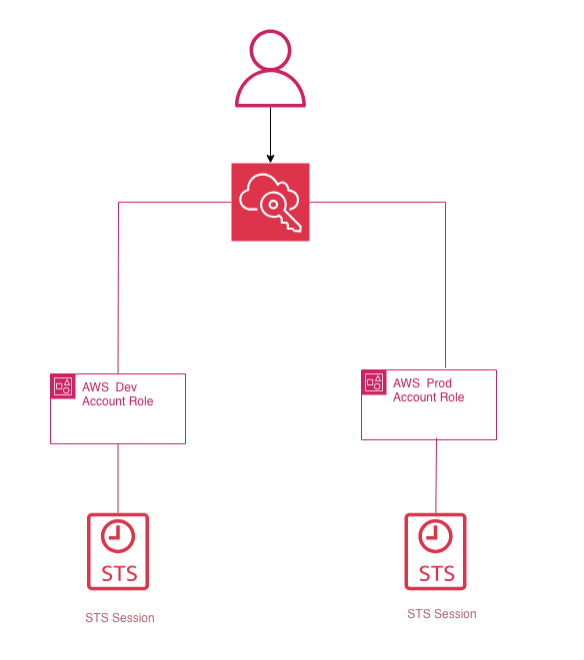
Translated into practice: the user signs in once, sees only the accounts and roles relevant to them, and you do not need to distribute local users everywhere. This does not replace STS: it finally makes it usable in a clean way for people.
STS is the real operational glue
Multi-account truly works when you stop thinking about it in terms of duplicated users and start thinking about it in terms of trust + temporary credentials.
AWS STS, through AssumeRole, returns temporary credentials with limited duration: access key, secret key, and session token. They are the technical foundation of roles and federation. They do not permanently belong to the identity that uses them, they expire, and they are the correct way to handle intra-account and cross-account access without spreading static credentials around. AWS generally recommends using roles and temporary credentials for both human users and workloads.
That is why, in a serious multi-account architecture, the question is not “how do I get into that account?”, but “which role can I assume, from which identity, to perform which operation, for how long?”.
When this part is clear, everything else becomes simpler: automation, audit, operations, revocation, MFA, CI/CD. When it is not clear, the workarounds begin — and sooner or later, you pay for them.
An initial pattern that often works
There is no universal topology that works for everyone. It depends on size, compliance, operating model, the degree of team autonomy, and the level of centralization you want to achieve.
That said, an initial pattern that often works is this:
a management account, a shared services or networking account, a dev account, and a prod account.
The important word here is “initial.” It is not an absolute baseline. It is a good starting point when you want to separate governance, shared services, and workloads without introducing premature complexity. AWS recommends using the management account only for activities that truly require that level and avoiding deploying workloads in it.
This, to me, is an important discipline: the management account is not the most convenient account where you put resources; it is the one you should keep as clean as possible.
RAM and shared VPCs really do change the way you design
One of the services that changes AWS architecture more than it might seem is AWS RAM.
For years, the implicit model was: each account has its own resources, and if you want them to talk to each other, you start with peering, transit gateway, exceptions, and compromises. With RAM, however, some resources can be shared natively across accounts or OUs, and this opens up more interesting patterns.
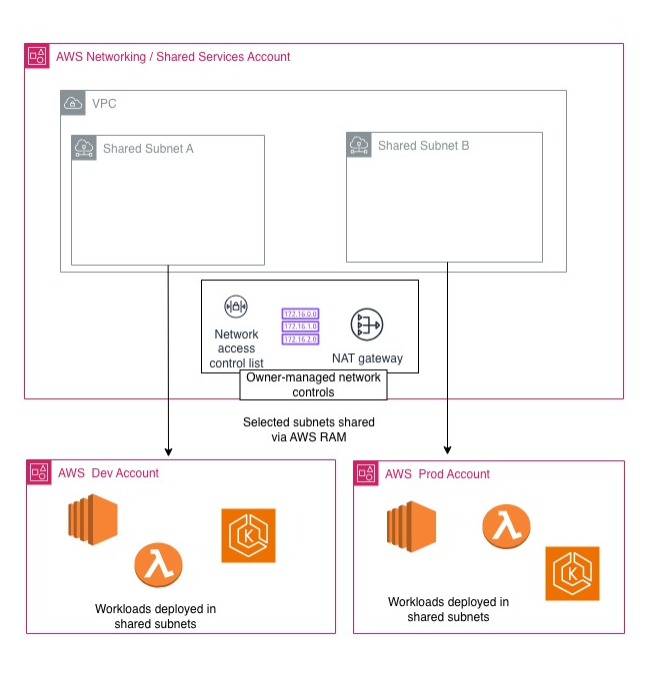
The most powerful case is VPC sharing. The owner account shares non-default subnets with other accounts in the same organization. After the sharing is in place, participants can see the shared subnets and create, modify, and delete their own application resources within them. They cannot, however, modify the shared subnets or manage resources that belong to the VPC owner or to other participants. Some actions explicitly remain the owner’s responsibility.
This truly changes the operating model: you centralize networking and decentralize workloads. It is not always the right choice, but when you have multiple application teams and want consistency in networking, routing, egress, and controls, it is a very strong pattern.
A simple but realistic practical case
Imagine a platform with a networking/shared-services account that owns the VPC and the subnets, and two workload accounts: dev and prod.
The subnets are shared via RAM. Teams deploy EC2, containers, or other workloads in their respective accounts, but within a common network controlled centrally. SCPs act as organizational guardrails. Human operators access via IAM Identity Center. Cross-account operations go through roles assumed with STS.
Even at this stage, you have already achieved three things that, in a single account, constantly get blurred together: separation, governance, and operations.
The same principle applies to S3: less folklore, more policy
When it comes to cross-account access to S3, I think it makes sense to immediately update the way we talk about it.
Historically, the conversation often ended up revolving around ACLs. Today that narrative is far less central, because S3 Object Ownership defaults to Bucket owner enforced, and with that setting ACLs are disabled. In that model, the bucket owner owns the objects and governs access through policies. AWS explicitly recommends disabling ACLs on new buckets. For cross-account access, when the bucket and the identities are in different accounts, AWS documentation also makes it clear that the correct grants are required on both the IAM side and the bucket policy side.
For this reason, in a modern architecture, I find it cleaner to reason in terms of well-defined roles and readable resource policies, rather than historical layering that nobody wants to debug anymore.
Where I see the most frequent mistakes
The first is using SCPs as a substitute for IAM.
The second is having multiple accounts but no serious trust and role assumption model.
The third is treating the management account like a normal operational account.
The fourth is introducing shared VPCs without clarifying responsibilities and limits between the owner and the participants.
The fifth is continuing to describe cross-account access to S3 as if we were still in the ACL era.
The final point
AWS does not force you to design well.
You can absolutely keep everything in a single account, mix environments, distribute permissions in ways that are hard to read, and postpone every structural decision. For a while, it works. That is exactly the problem: it works just enough to make you believe it is sustainable.
To me, maturity on AWS begins when you understand that the issue is not “how many services do I use,” but how I design boundaries, trust, and governance.
The problem isn’t AWS.
The problem is continuing to think in terms of a single account when your context has, for quite some time now, outgrown it.